
From Files to Relational Tables: Why We Need Databases
Database
SQL
PostgreSQL
7 days ago2110 words·11 min readWhat You'll Get Out of This
- Understand why
localStorageand JSON files "break down as they grow"; - Rebuild a "table" from a bunch of JSON objects by hand, and get to grips with rows, columns, fields, and primary keys;
- See exactly which three problems a database solves that a hand-rolled file approach can't.
Before We Start
- You just need to read basic JavaScript objects and arrays (know what JSON looks like);
- This whole series is written from a front-end perspective. I'd suggest skimming the series guide first so the full roadmap is in your head:
A Scenario to Start From
You recently built a small tool for a friend: a shared book-buying list. The first version was dead simple — data lived straight in the browser's localStorage:
js
localStorage.setItem("books", JSON.stringify(books));With a few dozen books, everything worked. But once the list passed a few hundred entries, the requirements started piling up:
- filter by "already read", sort by price;
- search the whole list for a particular book title;
- your friend wants to edit it too, and two people's edits can't overwrite each other.
localStorage hit its limit. So you moved the data to the backend and stored it as a JSON file:
js
// books.json
[
  { "title": "Database Internals", "author": "Alex Petrov", "price": 79, "read": false },
  { "title": "DDIA", "author": "Martin Kleppmann", "price": 118, "read": true }
]
Now the problem shifted from "nowhere to put the data" to "the data isn't easy to use." As soon as you need conditional filtering, a consistent format, and records that actually line up across lists, this naive file approach starts leaking — one problem after another.

When there are so many records that memory alone can't manage them, you need an organizing principle — that's exactly why databases exist.
Three Ways the File Approach Falls Apart
Conditional Lookup Means Reading the Whole File
To find "books under 50", you have to read the entire file into memory, then loop and test:
js
const books = JSON.parse(fs.readFileSync("books.json", "utf8"));
const cheap = books.filter((b) => b.price < 50);
With a few hundred entries that's fine. With tens of thousands, every query becomes an O(n) full scan — read, parse, loop. Worse, there's no shortcut: without reading every record, you can never know the answer.
Nothing Constrains the Data's Format
Every record's "shape" has to be maintained by hand. A slip of the fingers, and you get dirty data like this:
js
[
  { "title": "Database Internals", "author": "Alex Petrov", "price": "79", "read": false },
  { "title": "DDIA", "price": 118 } // forgot author, price is a number here
]
price is the string "79" in one record and the number 118 in another, and one entry is missing a field entirely. The day price < 50 silently returns NaN or undefined, you won't know which record broke it. In the file approach, "consistent format" is an oral agreement that relies on discipline.
Related Records Are Linked by "Numbers You Have to Remember"
Books need categories, and you want to track who read what — so now there are categories and reading logs. How do they relate? In JSON it's "I just remember that this book's id is 5":
js
{ "bookId": 5, "readAt": "2024-01-01" }Type bookId: 9 by accident, and that record points at a book that doesn't exist — nothing will warn you. Cross-table consistency is discipline-based in the file world too.
These three pain points are precisely why databases were born: query capability, data constraints, and consistency guarantees. And the first step toward solving them is turning files into tables.
Turning JSON Objects into a Table
That books array is actually one step away from being a "table." Look at this diagram:
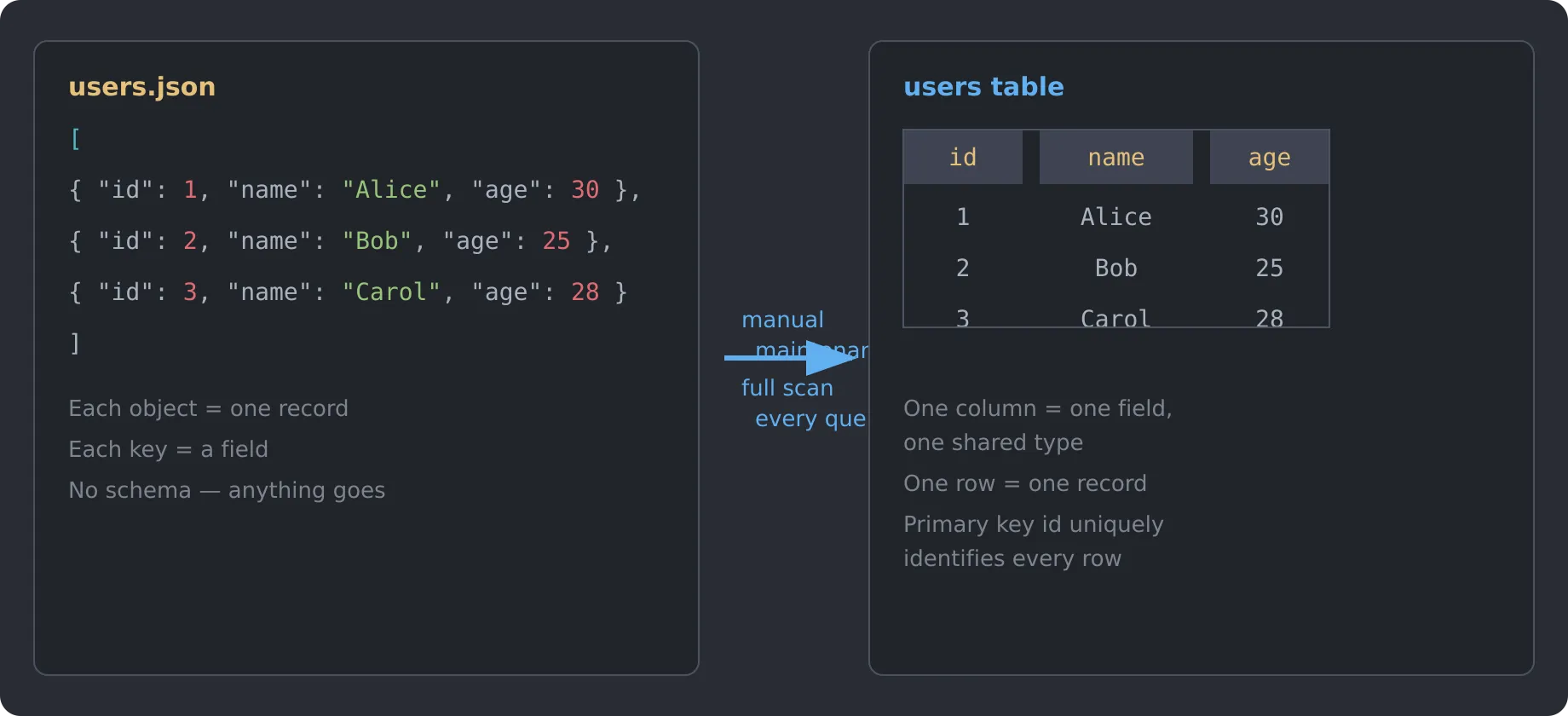
On the left is the file approach; on the right is the "table." The mapping is straightforward:
- Each JSON object → a row (a record);
- Each key of the object → a column (a field);
- All objects sharing the same keys → the table gets a fixed column structure.
A table is simply a collection of records with the same structure. Read across, it's rows of records; read down, it's columns of fields.
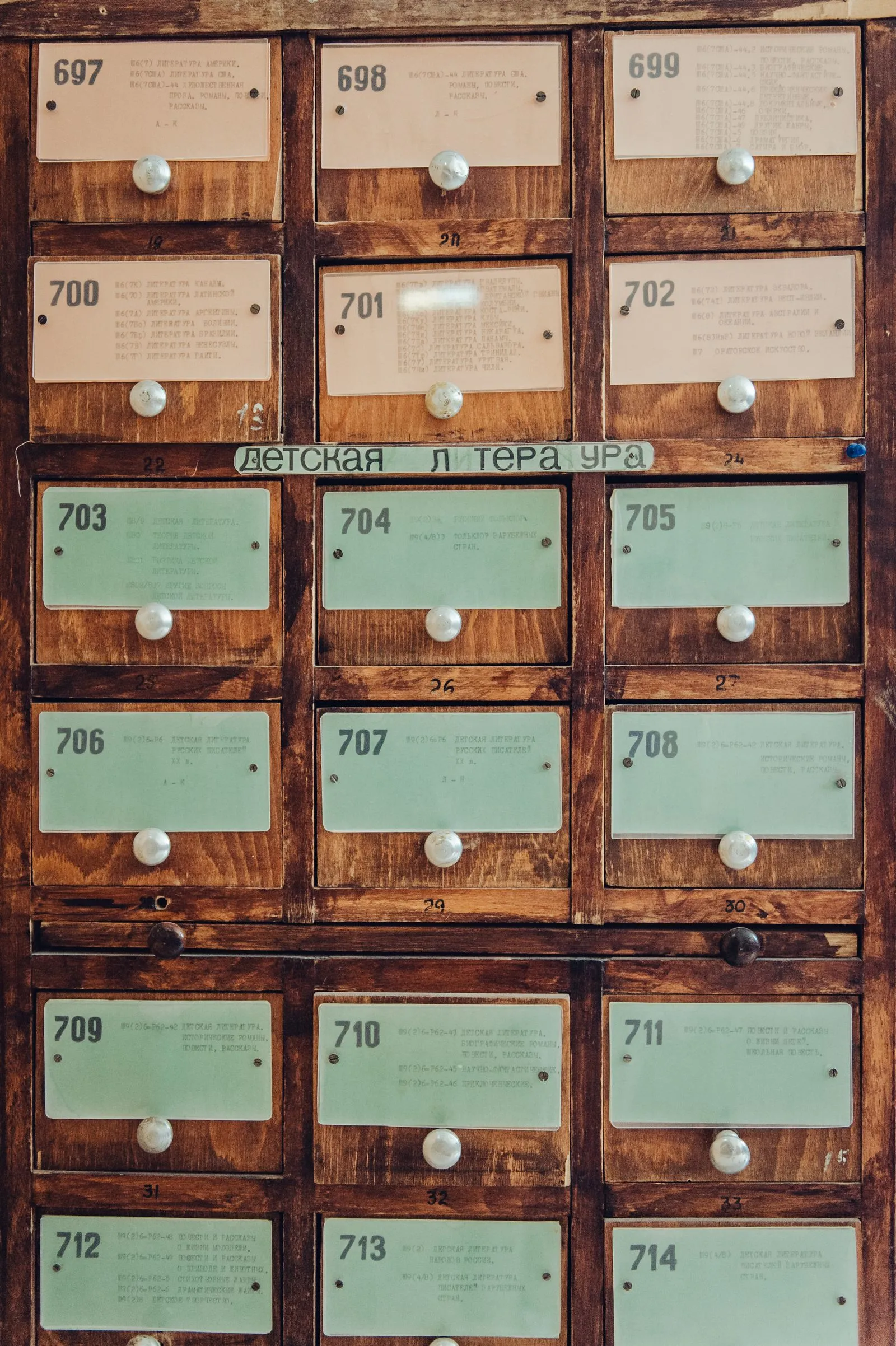
This organizing idea isn't new at all. A library's card catalog is a living "table": one whole drawer = a table; each card in the drawer = a row; the "title / author / call number" entries on a card = three columns. Librarians figured this out long before computers existed: when records grow too many to manage by memory, they must be given a fixed structure and looked up by that structure.
By turning a "file" into a "table," the first thing a database does is constrain free-form data into a uniform collection of records.
Primary Keys: Making Every Row Uniquely Findable
The table is built — now a new problem: how do you point at a specific row?
In the file approach, you use array subscripts like books[3]. But subscripts shift — delete one book and every index after it is wrong. And a subscript carries no meaning: which book is books[3]? You have to read the data to find out.
So every table needs a primary key: a column (or a few columns) whose values never repeat and stay stable, dedicated to uniquely identifying each row.
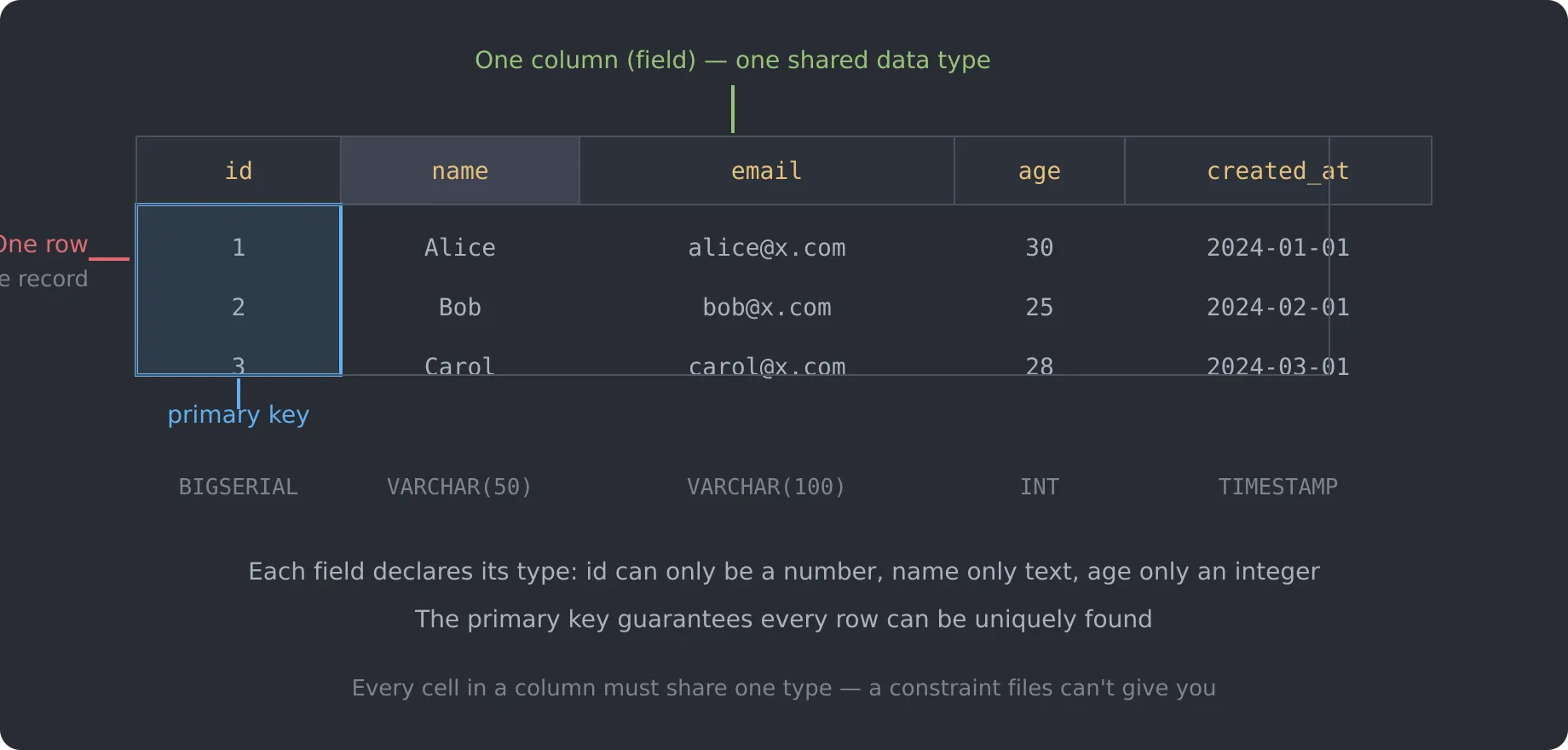
Add an id column to books, and every row gains a stable identity:
sql
CREATE TABLE books (
  id     BIGINT PRIMARY KEY,
  title  VARCHAR(200),
  author VARCHAR(100),
  price  INT,
  read   BOOLEAN
);
Now you can say "give me the book with id = 5" instead of "give me the 5th element." The distinction matters: an id is the identity of the data; a subscript is a snapshot of position — and position goes stale the moment data is inserted or deleted.
Data Types: Turning "Any Value" into "This Cell Can Only Be a Number"
Look at the bottom row of the diagram above — every column declares its type: title can only be text, price only an integer, read only a boolean.
This is the most visible difference between a database and a file approach: validation happens at write time. In a database, if you try to stuff the string "79" into the price column, the database simply refuses:
txt
ERROR: invalid input syntax for type integer: "79"No hand-written validate() functions, no 2 a.m. debugging sessions wondering "how did this field become a string?" Type declarations upgrade "an oral agreement" into "a rule written into the table structure and enforced by the database."
Foreign Keys: Cross-Table References Without Relying on Memory
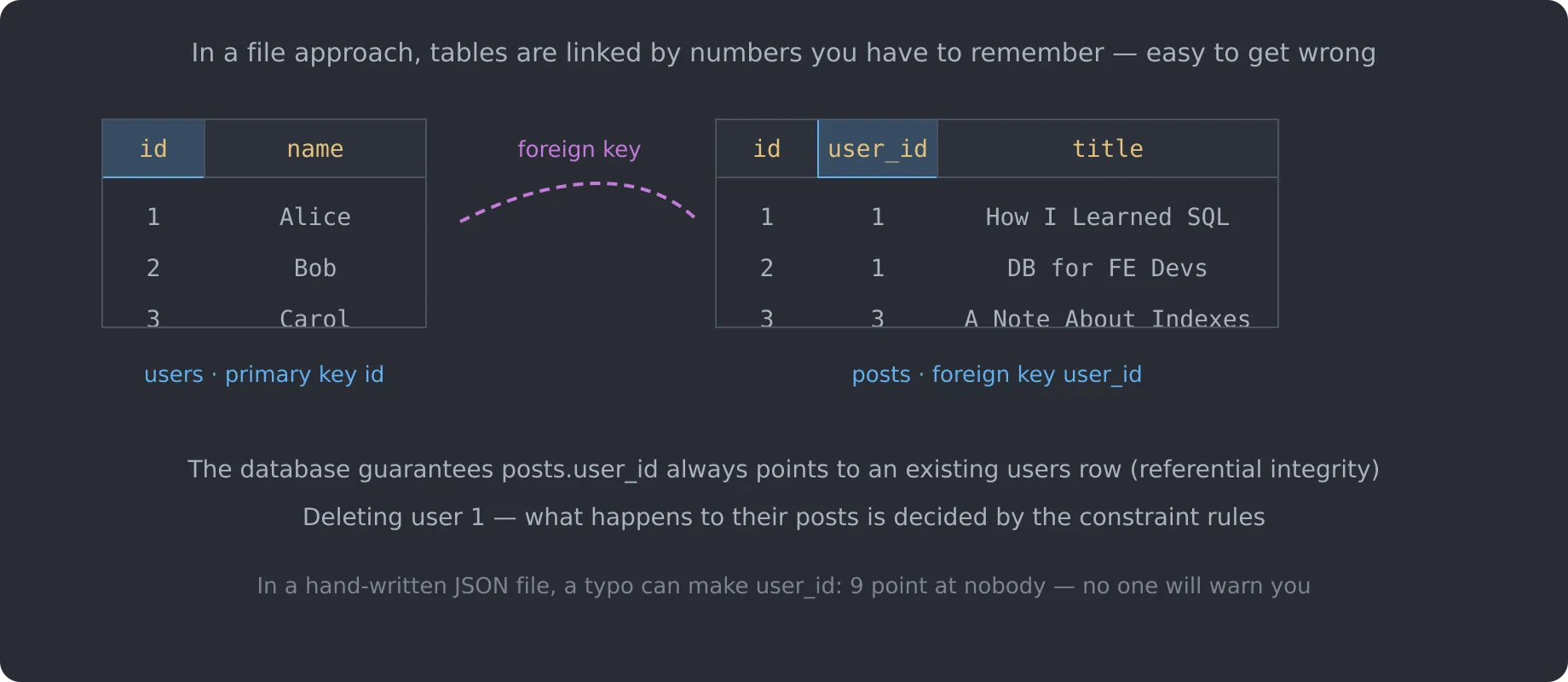
Back to the sneakiest pain point: consistency across tables. In a relational database, this kind of "reference" is formalized as a foreign key:
sql
CREATE TABLE posts (
  id      BIGINT PRIMARY KEY,
  user_id BIGINT REFERENCES users(id),
  title   VARCHAR(200)
);
A foreign key declares one thing: "the value in this column must be an id that actually exists in the users table."
- Insert a row with
user_id = 9when there is no user with id 9 → the database rejects it; - Before deleting a user, the database checks whether they still have posts, and handles them according to the rules you define.
This "referential integrity" is a matter of discipline in a JSON file and a hard constraint in a database. You write far less defensive code, and you spend far fewer late nights digging through data.
So What, Exactly, Does a Database Solve?
Back to the three original pain points — now we can give the database a clear position. Compared with "read the JSON file into memory and loop yourself," a database provides:
- Query capability: data is stored and accessed structurally, so not every query is a full scan (in the next article we'll see how a SQL statement is parsed and optimized);
- Data constraints: primary keys, types, uniqueness, not-null — the format is enforced by the database instead of human discipline;
- Consistency: cross-table references (foreign keys) and correctness under concurrency (transactions) are guaranteed by the database, not by discipline.
In one sentence: the file approach leaves "data format" and "data rules" to your discipline; a database writes them into the structure and enforces them.
That's not to say JSON files are useless — for small, single-machine, loosely-structured workloads, a file is simple and perfectly adequate. Databases exist for data that grows larger, gets more complex, and needs multiple people to work on it. The moment to switch is exactly the moment your data starts feeling "hard to use."
Going Deeper: Why "Relational" Databases?
"Relational" here isn't about personal relationships — it's about how tables connect to each other. The core ideas of a relational database:
- Data is organized in tables (rows = records, columns = fields);
- Tables connect through shared values (primary/foreign keys), not through "pointers" or "file paths";
- Queries think in sets: "I want the titles of books under 50", not "give me elements 2 through 7."
That last point deserves a closer look. In the file approach, you describe how to find (read the file, loop, test); in a database, you describe what to find (WHERE price < 50). The former is "procedural," the latter is "declarative." And it's the declarative world that sets the stage for the stars of later articles — indexes and the query optimizer — which are responsible for translating your "what to find" into an efficient "how to find."
Hands-On Practice
Exercise 1: Turn JSON into a Table
Grab some real data of yours (a reading list or a task list works), and pick 10 records:
- Write out the fields they share, and choose a sensible type for each;
- Add an
idcolumn as the primary key; - Build the table and insert the data using the SQL below (PostgreSQL syntax — a local Docker postgres is enough):
sql
CREATE TABLE tasks (
  id    BIGSERIAL PRIMARY KEY,
  title VARCHAR(200) NOT NULL,
  done  BOOLEAN NOT NULL DEFAULT false,
  due   DATE
);

INSERT INTO tasks (title, done, due) VALUES
  ('Finish chapter one', false, '2026-08-20'),
  ('Complete exercise 1', true,  '2026-08-15');
Exercise 2: Feel the "Declarative" Difference
Add a projects table to exercise 1, and have tasks reference it through a project_id column. Then:
- Insert a record whose
project_iddoesn't exist, and watch the database reject it; - Try deleting a project that still has tasks, and see how the constraint blocks you;
- Think about it: how many lines of defensive code would the same operations take in a JSON-file approach?
Summary and Keywords
- A table = a fixed set of columns + a uniform collection of records; objects become rows, keys become columns;
- Primary key: unique, stable values that identify each row — not subscripts;
- Data types: validation at write time, turning "format by discipline" into "format by structure";
- Foreign key: makes cross-table correctness a hard database constraint;
- The file approach describes how to find things (procedural); the database describes what to find (declarative).
Keywords: table、row、column、field、primary key、foreign key、data type、declarative query、relational database、localStorage、JSON
What's Next
This article finished the "what the data looks like" transformation: from free-form files to tables with structure, constraints, and relationships. But the table is only the database's skin. Before we climb inside a SELECT, there's a missing skill to build first — actually writing one. If SQL keywords still feel foreign, start here:
Then we'll go inside the SELECT you now know how to write and see what it goes through — the parser, the optimizer, the executor — and meet EXPLAIN for the first time:
You'll see that the database can "optimize" your query precisely because of the structure we introduced here.