The Journey of a SQL Statement
Database
SQL
PostgreSQL
7 days ago1960 words·10 min readWhat You'll Get Out of This
- Know which checkpoints a
SELECTpasses through between pressing Enter and getting results; - Understand the division of labor between the parser, the optimizer, and the executor — who decides whether it runs, and who decides whether it runs fast;
- Read a simple
EXPLAINoutput for the first time.
Before We Start
- Read the series in order. This article assumes you can already write a query — if SQL keywords still feel unfamiliar, go through the primer first:
- And make sure "table", "primary key", and "declarative query" are fresh:
- A PostgreSQL you can run (a Docker
postgresimage is plenty).
A Scenario to Start From
You wrote this query for your book list — find every book priced under 50:
sql
SELECT title, price FROM books WHERE price < 50;In the file approach (the books.json from last time), you'd read the file, write a loop, and test each record yourself. In a database, you do exactly one thing: describe what you want. After you hit Enter, everything else is the database's job.
But have you ever wondered what actually happens after you hit Enter? Your SQL is just text — a database can't "execute" a string of characters directly. It first has to understand the sentence, then decide how to get the data, and only then start fetching.
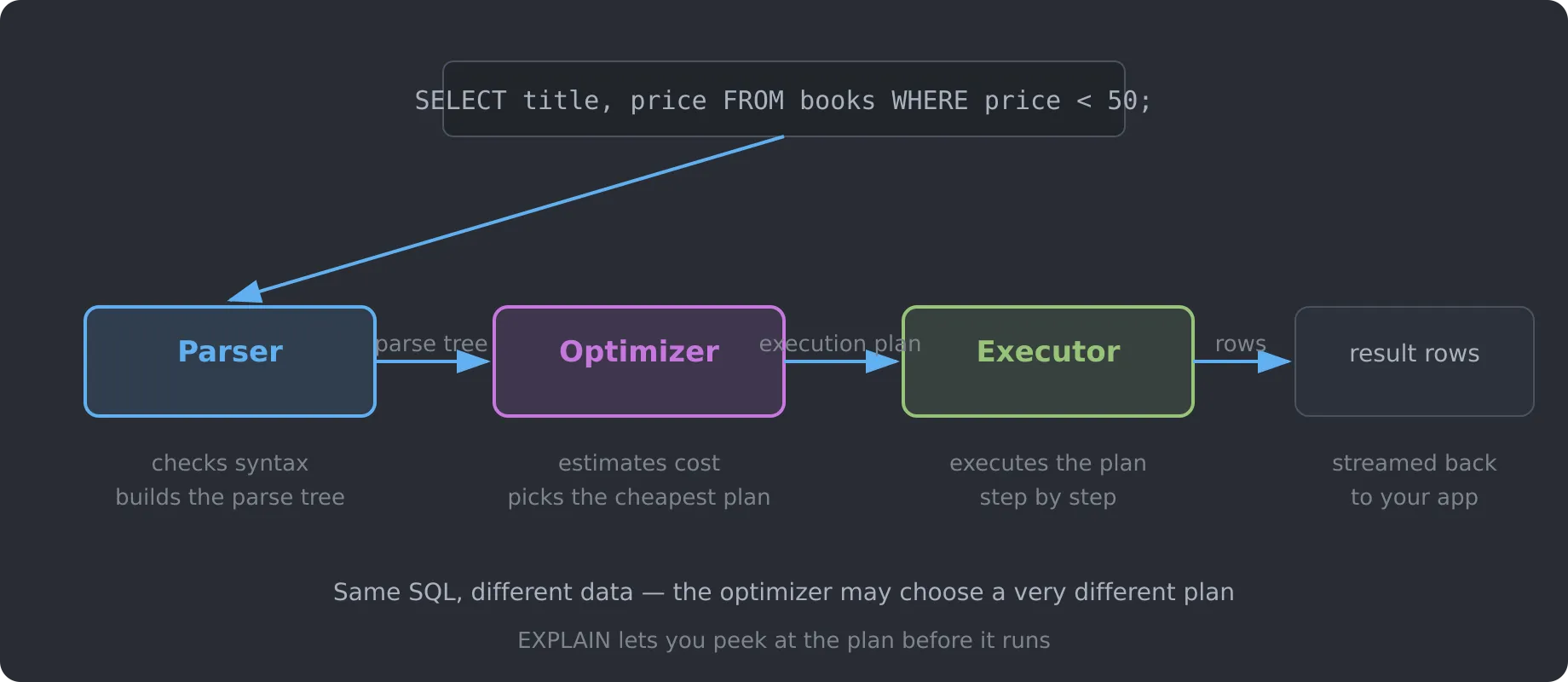
A SQL statement's journey has four checkpoints:
- Connect — prove you're allowed through the door;
- Parse — turn text into structure (a parse tree);
- Optimize — pick the cheapest execution plan from several candidates;
- Execute — pull out the rows according to the plan and hand them to you.
The first two are just "understand and translate." Almost all of the real performance difference happens at the optimize step. That's why the same SQL can be lightning-fast against a 1-million-row table at work, yet crawl on your 10,000-row test table.
Checkpoint 1: Connect and Authenticate — Show Your Badge at the Door
This happens outside the database's front gate: the client opens a connection, the database verifies your username and password, and checks your privileges on the tables involved. It has almost nothing to do with query speed — but it's worth knowing about, because it sets up a topic we'll cover properly later: opening a connection is expensive, which is exactly why connection pools exist. We'll skip past this checkpoint and head into the lobby.
Checkpoint 2: The Parser — Turning Text into Structure
Your SQL is a string of characters, and the database can't execute a string. The first step is to translate it into an internal structure. That's the parser's job, and it happens in two stages:
Tokenizing: split the whole statement into minimal units — keywords, identifiers, numbers, symbols:
txt
SELECT  →  keyword
title   →  identifier
,       →  symbol
FROM    →  keyword
books   →  identifier
...Parsing: follow the SQL grammar and organize those tokens into a parse tree — a structured expression of "which columns I want, which table, with what conditions."
Note something important: the parser only cares whether the sentence is legal — it couldn't care less whether it's fast. Write SELEC title FROM books and the parser throws a syntax error on the spot. But SELECT title FROM books WHERE price < 50 and WHERE 50 > price are treated identically — they're just two ways of saying the same thing.
Here's the whole journey on one diagram:
Checkpoint 3: The Optimizer — Your SQL's Strategist
The parse tree answers what you want, but not how to get it. That's where the optimizer steps in — the smartest component in the whole database, and the real star of later articles in this series (indexes, and EXPLAIN in practice).
The optimizer does three things:
- Generates candidate strategies: based on the parse tree, it imagines several ways to fetch the data. "Read the whole table from start to finish, filtering row by row" is one; "if an index exists, jump straight to the matching rows" is another;
- Estimates cost: for each strategy, it uses the table's statistics (row count, data distribution, and so on) to guess how much cost the strategy would incur;
- Picks the winner: chooses the strategy with the lowest estimated cost and produces an execution plan.
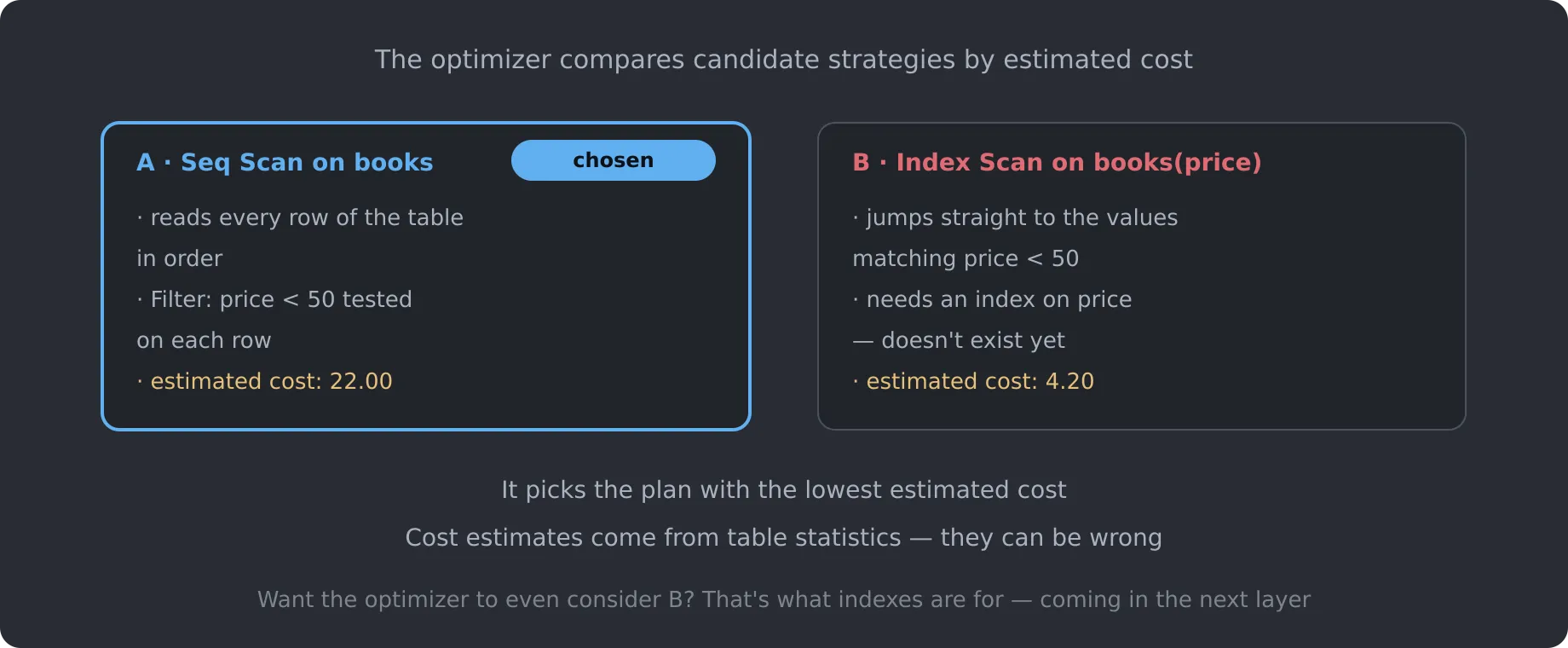
Three points from this diagram are worth remembering:
- "Chosen" doesn't mean "actually optimal." Costs are estimates built on statistics — when those statistics are stale or wrong, the optimizer can genuinely pick wrong;
- Strategy B requires an index. The optimizer isn't magic; it can only choose among available mechanisms. Without an index, it doesn't even get to consider B;
- The same SQL can produce completely different plans at different data scales. That's precisely why the optimizer matters: since you don't say how to look, it always picks whatever fits the current situation best.
And that's the dividend of "declarative" — from the last article, you describe what to find (WHERE price < 50), not how to find it. If you hardcoded "scan everything from the top," the optimizer would have no room to maneuver.
Checkpoint 4: The Executor — Turning the Plan into Results
Execution plan in hand, the executor gets to work. Its job sounds mechanical:
- Following the plan tree, it starts at the bottom-most "read table" node and pulls out rows one at a time;
- It drops the rows that fail
price < 50(that's what the plan'sFilternode does); - It keeps only the
titleandpricecolumns (a "projection"); - It streams the results back to your app row by row — it doesn't wait until everything is computed; the first row goes out the moment it's ready.
The executor isn't clever, but it's the only place that ever touches real data. No matter how brilliant the parser and optimizer are, the executor is the one that actually dredges up rows one by one — which is why the cost of reading data is the root of every performance problem that follows.
Your First Look at EXPLAIN
The execution plan normally lives inside the database, but you can pry it open with one command — our first formal meeting with EXPLAIN:
sql
EXPLAIN SELECT title, price FROM books WHERE price < 50;PostgreSQL returns this plan:
txt
QUERY PLAN
--------------------------------------------------------
 Seq Scan on books  (cost=0.00..22.00 rows=1200 width=52)
   Filter: (price < 50)
Let's take it apart piece by piece:
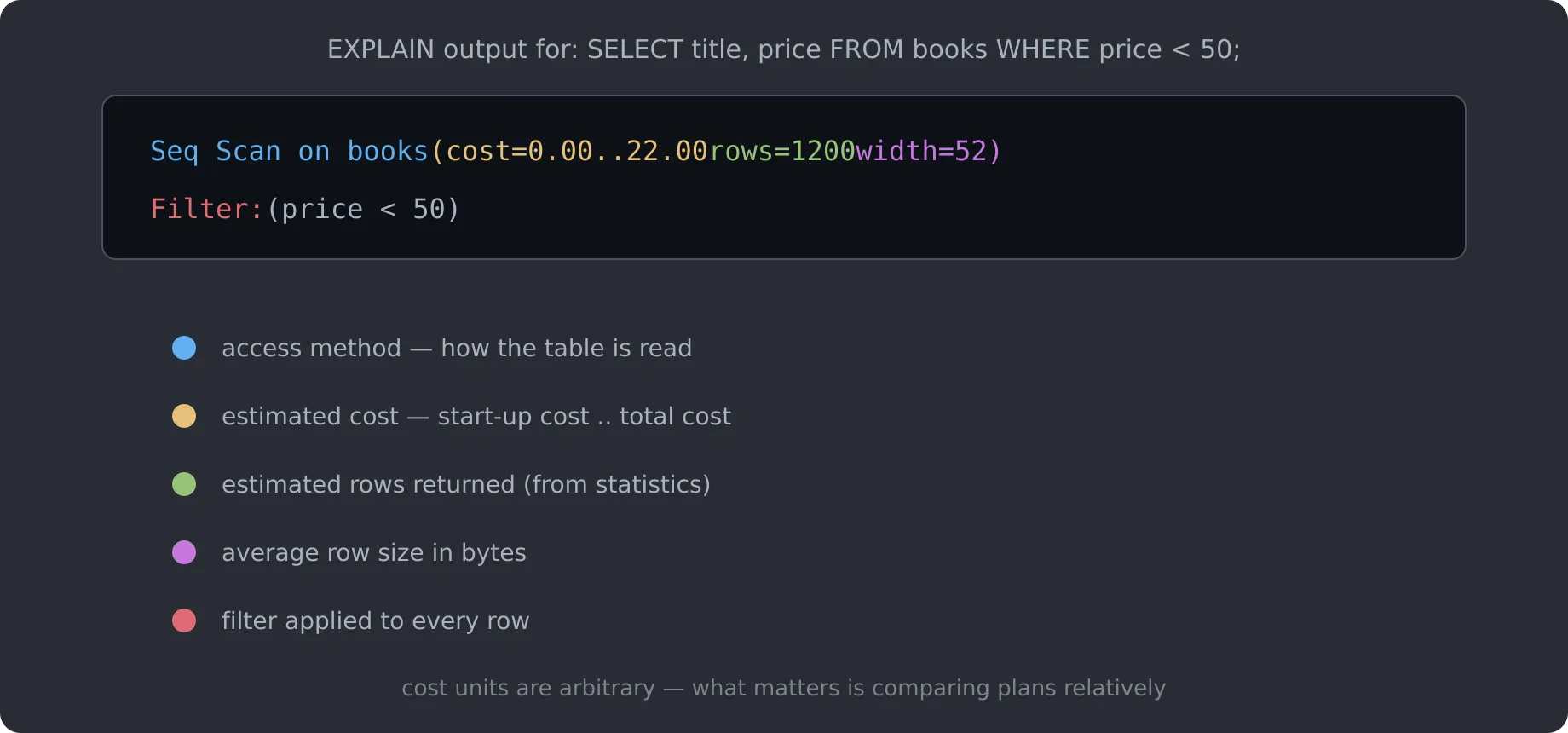
Seq Scan on books— the access method: a sequential scan. The database read every single row;cost=0.00..22.00— estimated cost: 0.00 start-up, 22.00 total. Notice these are abstract cost units — not milliseconds. They exist only for comparing strategies against each other;rows=1200— an estimate of 1,200 rows returned, based on table statistics;width=52— each row averages 52 bytes;Filter: (price < 50)— the per-row filter; rows that fail are discarded.
The most important line here is Seq Scan on books — it's telling you plainly: this query read the entire table. On a 100-million-row table, that "read the whole thing" is a disaster. And the rows=1200 beside it comes from statistics, so it can be wildly off (right after you've bulk-loaded data and statistics haven't been updated).
Starting with the next article, every discussion of "why indexes are fast" will ultimately land on this five-character difference: Seq Scan becoming Index Scan.
Going Deeper: Why "Declarative" Gives the Optimizer Its Stage
If you've written procedural code, this will click easily. In the file approach, a query looks like this:
js
const cheap = books.filter((b) => b.price < 50);You've decided everything for the computer: read the whole array, loop, test. Move to a different scenario (data on disk, 100 million rows), and this code still runs "according to plan" — it can't speed up.
In a database, you only describe the result:
sql
SELECT title, price FROM books WHERE price < 50;The database has total freedom over how to find it. When data is small it sequential-scans; when data grows and you add an index, it switches automatically; later, with read replicas and sharding, it still finds whatever approach fits best. Your query never changes — the database keeps upgrading its "how to find" strategy for you.
The price you pay: the optimizer must estimate using statistics. When those go stale, it can pick a lousy plan. So the first lesson of production tuning isn't "write fancier SQL" — it's "learn to read execution plans." That's exactly what the upcoming EXPLAIN in Practice article will teach you.
Hands-On Practice
Exercise 1: Watch a Full Table Scan
Spin up a PostgreSQL with Docker:
bash
docker run --name sql-journey -e POSTGRES_PASSWORD=postgres -d -p 5432:5432 postgres:16
docker exec -it sql-journey psql -U postgres
Create a table and load tens of thousands of rows:
sql
CREATE TABLE books (
  id    BIGSERIAL PRIMARY KEY,
  title VARCHAR(200),
  price INT
);

INSERT INTO books (title, price)
SELECT 'Book ' || g, (random() * 200)::int
FROM generate_series(1, 50000) g;
Now run EXPLAIN:
sql
EXPLAIN SELECT title, price FROM books WHERE price < 50;Look for Seq Scan on books and the estimated rows. Then swap the predicate for a primary-key lookup:
sql
EXPLAIN SELECT title FROM books WHERE id = 42;Compare the two plans — the second one becomes an Index Scan, with a much lower estimated cost. That query just previewed the "indexes" article coming up.
Exercise 2: See Statistics Drive the Plan
After mass-updating data (say, set every price to 1), run the same EXPLAIN again — notice how rows still shows the old values. Then refresh with ANALYZE books; and run it once more, watching rows update.
You'll see it live: the optimizer's judgment rests entirely on the quality of its statistics. This is why "remember to ANALYZE after big data changes" is a production rule.
Summary and Keywords
- A SQL statement's journey: parse (text → parse tree) → optimize (parse tree → execution plan) → execute (plan → result rows);
- The parser only checks whether the syntax is legal — it doesn't care about speed;
- The optimizer generates candidate strategies and picks the cheapest by estimated cost — the real source of performance differences;
- Cost estimates rely on statistics, and they can be wrong;
- EXPLAIN is the window into execution plans;
Seq ScanvsIndex Scanare the two words that matter most.
Keywords: parser、parse tree、optimizer、execution plan、executor、cost、statistics、EXPLAIN、Seq Scan、Index Scan
What's Next
We've walked a SQL statement's full journey and planted the concept of the execution plan in your head. But there's a big gap to fill: why does the optimizer count "reading the whole table" as so expensive? Why is Seq Scan the root of all evil?
Next we move into Layer 2 of the series and look at where data actually lives — disk, pages, and storage engines:
You'll finally understand why "reading from disk" is the performance bottleneck, and therefore why the optimizer spends all its energy on one goal: reading as little data as possible.